
Latestv1.0.63
Starter Plan
The job of a starter is not to show components. Its job is to help a team stand up a product shell in the first week.
For YH-UI, starters should be one of the highest-priority open-source growth layers.
What the first free starter should be
The strongest first candidate is an AI plus operations-console starter, because it can show all of these at once:
- AI components
- admin layouts
- tables and filters
- a flow route or canvas entry point
- theming and internationalization
- request-layer patterns
Minimum contents
Engineering layer
- Vue 3.5 + Vite
@yh-ui/yh-ui@yh-ui/request@yh-ui/flow- theme switching and i18n
- routing, layouts, mock data, and a basic permission shell
Page layer
- dashboard home
- AI workspace page
- operations table page
- Flow orchestration page
- settings / theme / locale page
The current AI Ops Starter
The repository now includes the first real consumer shell at apps/ai-ops-starter.
It is not a single-page demo. It is a runnable product shell that can keep evolving and can expose real consumer-side issues earlier than docs-only examples.
Implemented route shell
Dashboard: control-tower home for starter status, route readiness, and dependency modeWorkspace: a three-panel AI workspace with conversation rail, generative surface, reasoning, and source contextFlow Studio: orchestration shellOperations: data-dense operations surfaceSettings: workspace and tenant defaults
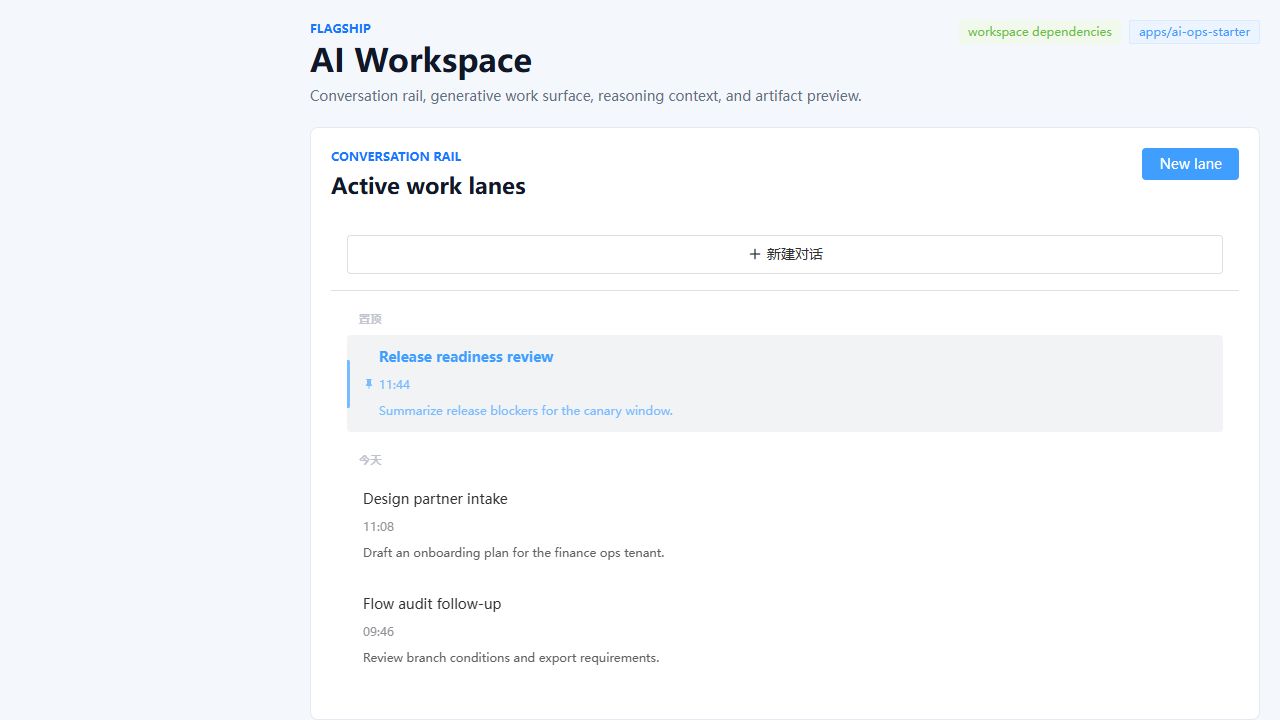
Current AI Workspace surface
This route has been tightened into a more product-like composition instead of a loose component collage:
- a left
Conversation Railfor lane switching and lane creation - a central
Generative Surfacefor multi-turn chat, prompt shortcuts, clear / stop actions, and artifact entry - a right column for
Thought chainandKnowledge recall - an artifact drawer powered by
YhAiArtifacts
Why this matters
- It exposes component-library issues through a real consumer shell, not only through docs demos
- It surfaces layout, density, scroll, and multi-panel composition problems earlier
- It gives future standalone starters, showcase entries, paid templates, and blocks a concrete upstream source
Current validation path
pnpm starter:dev:workspacepnpm starter:build:workspace
The workspace mode consumes local monorepo source directly, so component fixes can be verified against a real product surface immediately.
Experience layer
- empty, loading, and error states
- desktop-first UX with a narrow-viewport strategy
- clear navigation, breadcrumbs, filters, drawers, and detail views
What does not count as a starter
These are not enough:
- a few static demo pages
- sample views without layout, routing, or state
- screenshot-ready shells with no failure or empty states
- a repo that teams cannot realistically adapt into an internal tool
Starter sequence
| Starter | Target scenario | Priority |
|---|---|---|
| AI Ops Starter | AI workspace plus data console | First |
| Workflow Studio Starter | Flow orchestration and node configuration | Second |
| Commerce Ops Starter | Catalog, orders, filters, export | Third |
Delivery standards
A starter should at minimum:
- boot after
pnpm install - have a clear folder structure
- include real pages rather than empty shells
- include docs, screenshots, and extension guidance
- be reusable as a source for showcase entries and future blocks
Relation to open source and commercialization
Starters work well with a model of:
- free starter for adoption
- paid starter or block layers for higher-completion assets
- paid support for real implementation help
That is healthier than crippling the base component layer too early.